

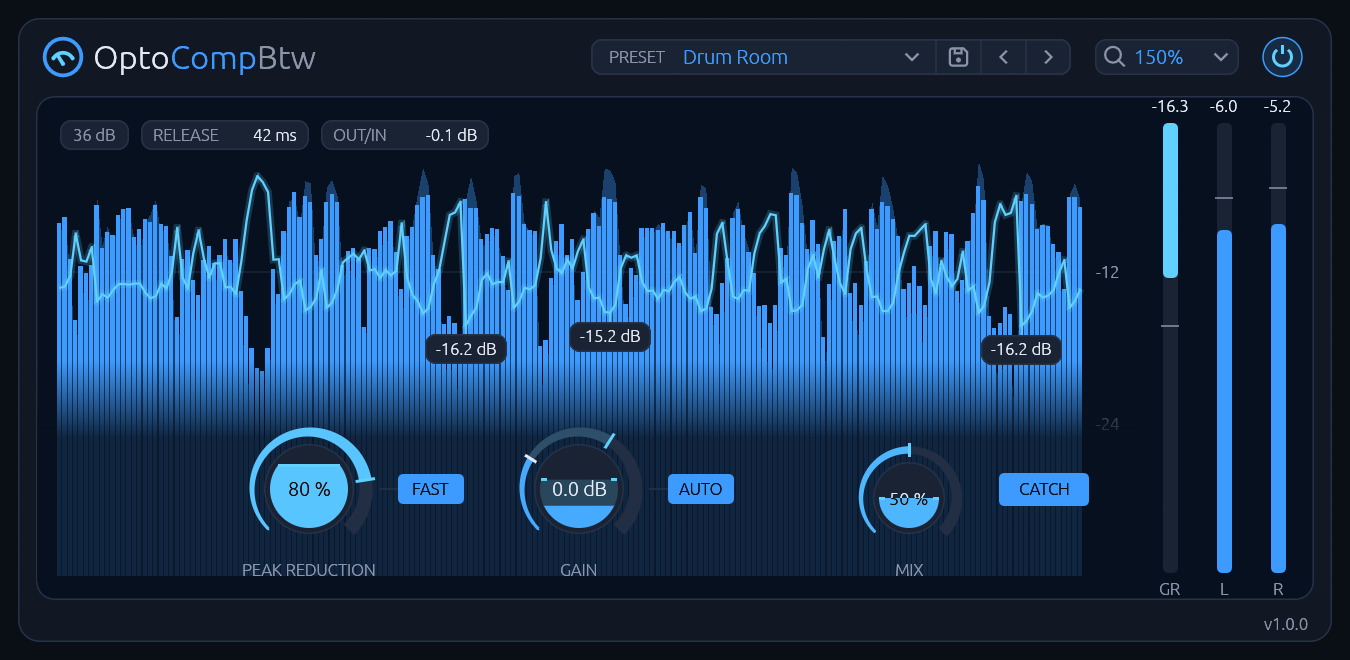
OptoCompBtw is a compressor of the slow, smooth kind. A light cell lit by the signal pulls the level down, catches a peak in a few milliseconds and lets go over tens of milliseconds after a word or seconds after a long loud passage, so it levels without sounding pumped. Turn PEAK REDUCTION and AUTO GAIN keeps the loudness about where it was, so you hear the levelling and not a louder signal. Two transformers and a tube stage colour it a little. FAST swaps in a quicker cell for drums and bass, CATCH adds a fast compressor for the spikes the cell lets through, and MIX blends in the dry signal. It has no latency. It is not a limiter and not a multiband compressor: one gain for the whole signal.
Read the manual for every control and how to use it.
Screenshots
What it's for
Features
- One knob for the squeeze: PEAK REDUCTION, with the release following the music: tens of milliseconds after a word, seconds after a long loud passage.
- AUTO GAIN: the makeup follows PEAK REDUCTION, so turning it doesn't make it louder. GAIN adds to it, or makes up all of it with AUTO off.
- FAST: a quicker cell, 11.7 dB down 1 ms after a hit where the slow cell is 1.4 dB down.
- CATCH: a fast compressor ahead of the cell (−10 dBFS, 4:1); under its threshold the sound is untouched.
- MIX for parallel compression, the levelled and the dry signal in phase.
- A display that shows what it does: the last 8 seconds of input, output and the reduction, the knobs on it, meters beside it, the release the cell is on now and OUT/IN, the output's loudness against the input's, which a click makes up.
- A little colour: two transformers and a tube stage, 0.5 % THD at a normal level.
- No latency.
- Presets: five built in beside Default, and your own; a preset never changes GAIN.
- Light: 0.59 % of a CPU core at the defaults, stereo at 48 kHz.
- Zoom from 100 to 200 %.
- No network access and no telemetry.
Install
Download the latest version from the Releases page, or with these commands:
curl -LO https://github.com/jelly-comet/OptoCompBtw-release/releases/download/v1.0.0/OptoCompBtw-1.0.0-linux-x86_64.tar.gz
curl -LO https://github.com/jelly-comet/OptoCompBtw-release/releases/download/v1.0.0/OptoCompBtw-1.0.0-linux-x86_64.tar.gz.sha256
sha256sum -c OptoCompBtw-1.0.0-linux-x86_64.tar.gz.sha256 && tar xzf OptoCompBtw-1.0.0-linux-x86_64.tar.gz
cd OptoCompBtw-1.0.0-linux-x86_64
Install for your user:
mkdir -p ~/.clap
rm -f ~/.clap/OptoCompBtw.clap && cp OptoCompBtw.clap ~/.clap/
Or for all users:
sudo mkdir -p /usr/lib/clap
sudo rm -f /usr/lib/clap/OptoCompBtw.clap && sudo cp OptoCompBtw.clap /usr/lib/clap/
Removing the old copy first avoids overwriting a file a running host has loaded. Then rescan plugins in your DAW.
To uninstall:
rm -f ~/.clap/OptoCompBtw.clap
Your presets stay in ~/.local/share/OptoCompBtw/presets/; delete that folder too if you want them gone.
FAQ
Is it free?
Yes. The download is free and MIT-licensed.
Is there a VST3 or LV2 version?
No. Releases contain the CLAP plugin only.
Does it run on ARM, like a Raspberry Pi or Apple Silicon?
No. It needs Linux on x86-64, on a CPU with AVX2.
Which hosts does it work in?
Any CLAP host. It was tried in REAPER.
Does it work on Wayland?
Through XWayland. The editor also needs a Vulkan driver.
Can I use it as a limiter on the master?
Not as a brickwall limiter: it levels slowly and smoothly, and a fast peak can get through. CATCH lowers the spikes, but put a limiter after it if nothing may pass 0 dBFS.
What's new in v1.0.0
20 Nov 2026 · Release on GitHub
OptoCompBtw 1.0: an optical leveller with one knob for how hard it squeezes, its gain made up for you, and a display that shows every decibel it takes.
- PEAK REDUCTION: a light cell that catches a peak in a few milliseconds and lets go over tens of milliseconds after a word, seconds after a long loud passage, so it levels without pumping.
- AUTO GAIN: the makeup follows PEAK REDUCTION, so turning it doesn't make it louder; GAIN on top, or all of it with AUTO off.
- FAST: a quicker cell for drums and bass. CATCH: a fast compressor ahead of the cell for the spikes it lets through.
- MIX for parallel compression, the levelled and the dry signal in phase.
- The display: the last 8 seconds of input, output and reduction with the knobs on it, meters, the release the cell is on now, and OUT/IN, which a click makes up.
- A little colour from two transformers and a tube stage.
- Presets: five built in beside Default, and your own; a preset never changes GAIN.
- No latency. 0.59 % of a CPU core at the defaults, stereo at 48 kHz. Needs a CPU with AVX2.
License
MIT, see LICENSE. The licenses of the third-party code in the binaries are in
THIRD-PARTY-LICENSES.txt in each release archive.
VST is a registered trademark of Steinberg Media Technologies GmbH. CLAP is an open standard by the free-audio project. OptoCompBtw is an independent project, not affiliated with or endorsed by the makers of any other compressor, and it models no particular unit.


